
TSL_Tally_Set ComponentThe screen grab below shows two instances of the component in use. 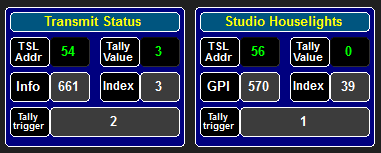
DescriptionThe TSL_Tally_Set component was designed for use as part of the BBC Academy Studio C BNCS control system. The installation uses a Miranda Kaleido-X Multiviewer to create the gallery displays. Those displays include status blocks for Reh/TX status, Houslights etc. A mechanism is required to activate these alerts. The Kaleido-X receives a feed of TSL UMD protocol in which the first 48 addresses are used for UMD text and tally. Addresses from 50 to 79 are available to signal miscellaneous properties. The TSL_Tally_Set component is the interface between the source of the data and the TSL tally bit in a chosen UMD address. At design time the user drops the component into a BNCS Script component box sized at 180 x 140 pels. The user can then enter the required operational parameters into the script editor persisting values dialog. The parameters to be set are listed later in this help file. The source of data can be either a GPI contact or an Infodriver slot. The driver ID and slot/contact are entered into the ref= field of an instance entry in the config/instances.xml file. An extra parameter must be added to the instance entry taking the form of either drvtype="g" (gpi contact) or drvtype="i" (Infodriver slot). If the parameter is omitted, the component will default to infodriver mode and an error report is sent to the system debug log. The type of driver is shown by the first box of the third row of the component mimic display, with the driver ID in the box to the immediate right. The GPI contact or Infodriver slot number extracted from the instance entry is shown to the right of the Index box on row 3. The TSL UMD address used to transport the flag(s) is shown on Row 2 of the mimic. The driver ID of the BNCS TSL UMD driver and the UMD address to be used for signalling are also an entry in instances.xml (using the ref= entry), but this does not need the devtype= element. Commands
NotificationsNone StylesheetsNone Developers NotesSetting tally_on to 0 for a GPI contact means the active output state will be set when the contact is at a 0, effectively acting as an invert compared to setting tally_on to 1.
|